
TinyAtelier
Your child's artwork deserves a gallery.
Scan, collect, and share — beautifully.

Your child's artwork deserves a gallery.
Scan, collect, and share — beautifully.
Eight years of crayon dinosaurs, organized.
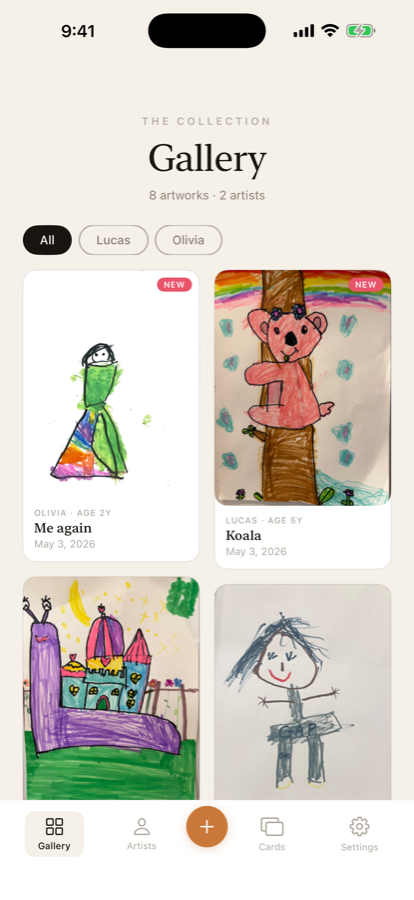
A waterfall of every piece, organized by child. Numbered, dated, and ready to scroll through with grandparents on a Sunday afternoon.

Flat scan with edge detection for drawings, 360° turntable for sculptures and LEGO, or true 3D LiDAR capture on iPhone Pro for the dinosaur on the kitchen table.
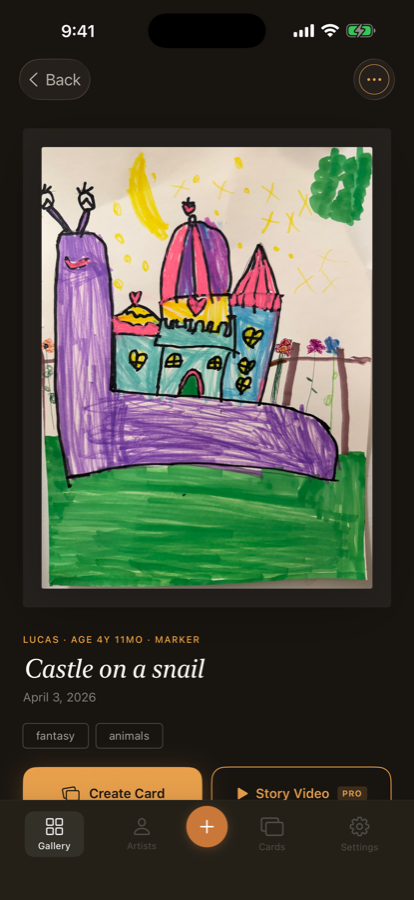
Title, date, the artist's age that day, tags, voice notes — a permanent record of this exact moment in their imagination.

Classic Frame share cards turn any drawing into something grandparents will save, print, or set as a wallpaper.

Each child gets their own page — birthday, age at every work, and a body of work that grows with them.

Gentle stats — total works, current streak, monthly chart — plus an AI growth analysis that traces how their style is evolving.

On iPhone Pro with LiDAR, capture true 3D models you can rotate from any angle. Clay dinosaurs deserve more than a single photo.

Scanning, gallery, voice notes, and the Classic Frame share card are always free. Pro unlocks AI titles, growth analysis, statistics, and 3D capture.
Short essays on saving the work your kids will outgrow.
A parent-developer's 4-step triage for the June artwork avalanche — sort, preserve, and keep what truly matters.
Last updated: September 28, 2026
TinyAtelier ("the App") is developed by Avira LLC. We take your family's privacy seriously. TinyAtelier is intended to be downloaded, set up, and operated by a parent or guardian — a child's role is to make art and, optionally, tell a parent about it while the parent records, not to operate the app or manage a subscription.
Everything TinyAtelier stores — artwork photos, child profiles, and voice recordings — stays in two places only: your device's local storage, and your own private iCloud container if you enable iCloud. This is a private CloudKit database tied to your Apple ID, not a shared or public one. We do not operate our own storage servers for this data, and Apple does not give us access to your private iCloud container. For how Apple itself handles this data, see Apple's Privacy Policy.
We collect no personal data for ourselves. Some data is sent to OpenAI, but only when you use an optional Pro AI feature — see "AI Features" below for exactly what that includes.
Your data — artwork photos, child profiles, and voice recordings — stays on your device and in your private iCloud container for as long as you keep it there. Nothing is deleted automatically.
Both AI features below are off unless you have an active Pro subscription and use the feature. Here is exactly what each sends, and to whom:
AI Art Recognition ("Describe Artwork"): sent to TinyAtelier's backend, which forwards it to OpenAI (gpt-4o-mini) — the artwork image (resized and compressed), the child's age in years if their profile has a birthday set (a number, not the birthday itself), and the artwork's title if you've typed one in. If you type your child's name into the Title field, that text is included in this request — avoid putting your child's name in a title if you want to keep it fully out of AI requests.
AI Growth Analysis: sent to our backend and forwarded to OpenAI — the child's age as a short string like "3y 5mo" (not their birthday), and for each new artwork: its title, creation date, any existing AI-generated description, tags, and medium.
Never sent for either feature: your child's name, their birthday, or voice recordings.
Our backend keeps a short-lived, in-memory cache (capped at 512 entries, cleared whenever the server restarts) so identical repeat requests don't call OpenAI twice — it stores only a scrambled fingerprint of the request plus the resulting description text, not the image itself. Devices are identified for rate-limiting purposes via Apple's StoreKit AppTransaction signature, which is unique per install but contains no user account information.
OpenAI processes these requests under their own API data usage policy — see OpenAI's API Data Usage Policies for exactly how long they retain API requests. Our backend infrastructure runs on Fly.io — see Fly.io's Privacy Policy for how they handle data passing through our hosted service.
TinyAtelier offers optional in-app subscriptions managed entirely through Apple's App Store. Payment processing is handled by Apple. We do not collect or store payment information.
TinyAtelier is built to be used by a parent or guardian on their child's behalf. The app requires no account, sign-in, or email address from anyone, parent or child. Only a parent or guardian enters child profile information, once during setup. We do not knowingly collect data directly from children, and the app has no mechanism for a child to create an account, make a purchase, or contact anyone.
TinyAtelier does not use any analytics SDKs, tracking pixels, or advertising frameworks. We do not track you.
If you have questions about this privacy policy, contact us at info@avirallc.org
Need help with TinyAtelier? Here are answers to common questions:
All artwork photos and voice recordings are stored locally on your device. If you enable iCloud, they sync through your personal iCloud account.
Yes. Scanning, gallery, share cards, and voice notes are all free. AI art recognition, growth analysis, statistics, 360° turntable, and LiDAR 3D capture require TinyAtelier Pro.
Go to iPhone Settings → Apple ID → Subscriptions → TinyAtelier Pro → Cancel.
Email us at info@avirallc.org and we'll help you out.